Have you wondered what Separates a Training Video That Gets Watched From One That Gets Skipped? Most corporate teams now have the tools to create video. The gap is not access to video creation software. It is knowing what makes a video effective once it exists.

Nibu Thomas
Over 88% of large companies now use video as a core part of their learning programs. The adoption question has largely been settled. The production question has not.
Because access to video creation software is no longer the barrier, the conversation has shifted to a harder problem: what makes a training or documentation video actually work? Not just get recorded and uploaded, but get watched, completed, and acted on.
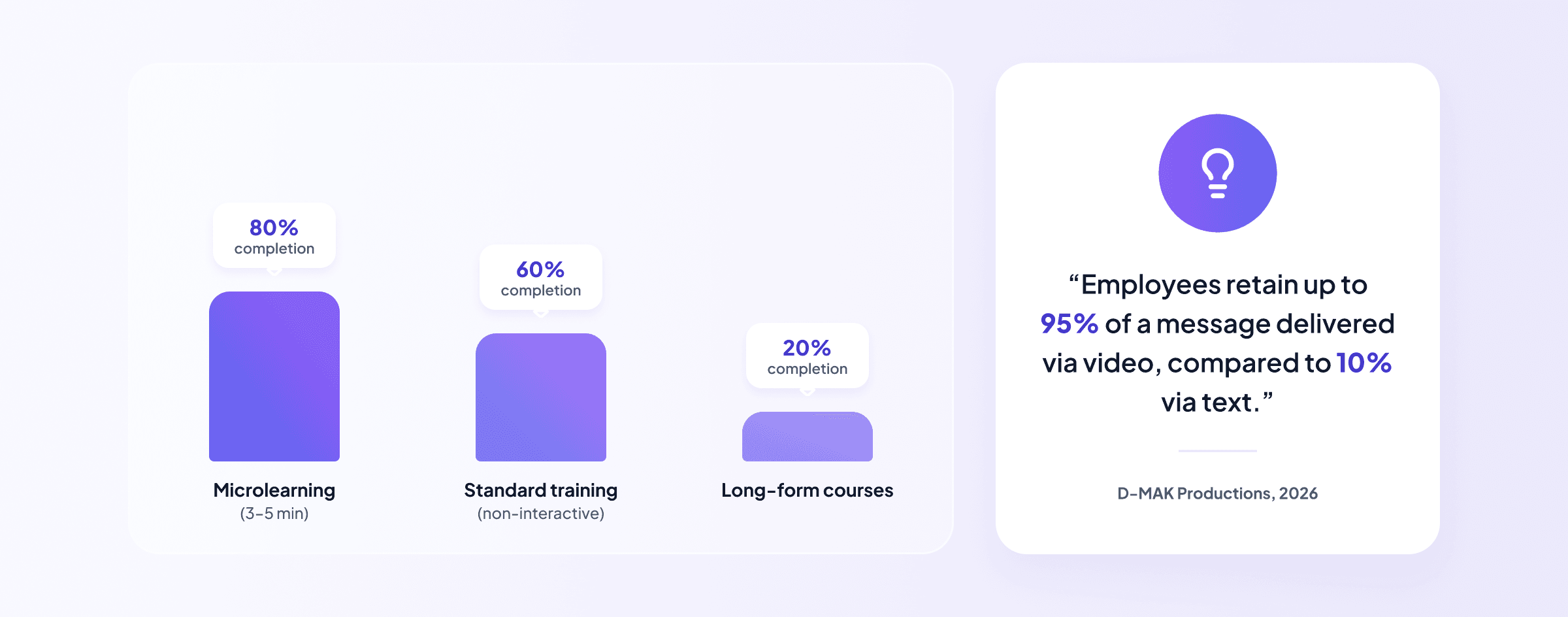
The data on this is unambiguous and, for most teams, uncomfortable. The average non-interactive training video has a 60% completion rate (Learning Management System Insights, 2024). Microlearning modules average 80% completion. Long-form video courses average 20%. The difference between those outcomes is not production budget. It is structure, length, and intent.
"Employees retain up to 95% of a message delivered via video, compared to 10% via text. But that advantage disappears entirely if the video is poorly paced, too long, or ends without a clear next step." — D-MAK Productions, Corporate Training Video Production Guide, 2026
What follows is a framework for making video that earns its completion rate. It applies whether your team is recording product walkthroughs, onboarding guides, process training, or customer education content.
What Makes an Effective Corporate Training Video?
An effective corporate training video is one that a viewer finishes, understands, and acts on. That sounds obvious, doesn’t it? In practice, most training videos fail on at least one of those three dimensions because they are designed around the creator's knowledge rather than the viewer's journey.
The most common failure pattern is straightforward to describe: a subject matter expert records everything they know about a topic, in the order they know it, at the length required to cover it fully. The result is a comprehensive video that serves the creator's need to document and the viewer's need to learn in entirely different ways.
The structural fix is to design every video around a single outcome. Not a topic, but an OUTCOME. Not 'an introduction to the platform' but 'how to set up your first project in under ten minutes.' The specificity of the outcome determines the scope of the video, which determines its length, which is the single most reliable predictor of whether it gets finished.
Six Practices That Determine Whether Your Video Gets Watched
The following table is not a checklist of nice-to-haves. Each practice addresses a specific, data-evidenced failure mode in corporate video production.
Practice | What it means in production | Impact on completion | Common failure mode |
|---|---|---|---|
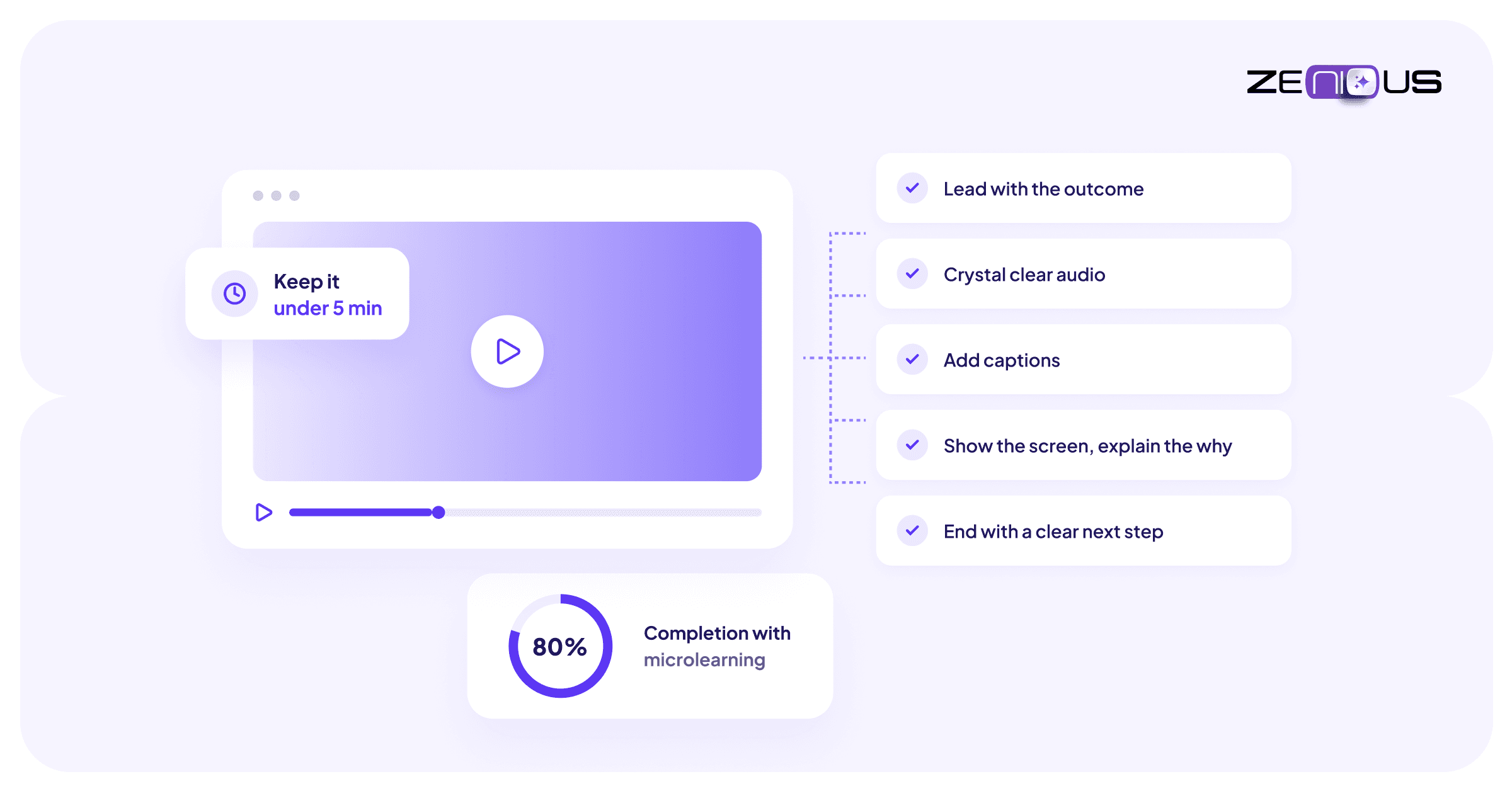
Keep modules under 5 minutes | Break long processes into discrete, titled segments. | Microlearning modules average 80% completion vs 20% for long-form content (Continu, 2024). | One 25-minute walkthrough covering six unrelated topics. |
Lead with the outcome, not the process | Open every video by stating what the viewer will be able to do. | Viewers who understand the goal complete 23% more of the content (Clixie, 2025). | Starting with background context before the first actionable step. |
Prioritise audio over everything else | Record in a quiet space with a decent microphone before worrying about visuals. | Poor audio is the #1 reason viewers abandon training videos (TechSmith, 2024). | HD screen recordings with echo-heavy room audio. |
Add captions as standard, not as an afterthought | Caption every video in every language it will be distributed in. | 80% of caption users are not hearing impaired; captions benefit all viewers (Verizon Media, 2024). | Leaving unedited auto-captions with accuracy errors. |
Show the screen, narrate the why | Annotate key clicks with callouts and explain the reason behind each action. | Contextual narration boosts retention by up to 40% compared to click-by-click narration alone (Research.com, 2024). | Narrating “click here, then here” without explaining why. |
End with a single, clear next step | Tell viewers exactly what to do immediately after watching. | Defined next steps increase post-training action rates by 31% (Intellum, 2024). | Ending with “Any questions, reach out to your manager.” |
Sources: Continu (2024), Clixie (2025), TechSmith (2024), Research.com (2024), Intellum (2024)
The pattern across all six practices is the same: the videos that get watched are designed for the viewer's limited attention and specific goal, not the creator's comprehensive knowledge of the subject.
On Length: The Most Misunderstood Variable
Length is where most teams make their biggest mistake, and it is worth addressing directly. The intuition that a longer video is more thorough, and therefore more valuable, is consistently contradicted by completion data.
Microlearning modules of three to five minutes average 80% completion. Conventional long-form training videos average 20% (Continu, 2024). A viewer who abandons a video at the 40% mark has retained less than a viewer who completes a shorter video covering the same ground.
The practical implication is that a 20-minute onboarding walkthrough covering eight topics should almost certainly be eight videos of two to three minutes each. Not because modern attention spans are short, but because a viewer who needs to re-watch step four should not have to scrub through seventeen minutes of content to find it! Modular structure serves the viewer at the moment of need, not just at the moment of first watching.
"Companies using eLearning with visual instruction can reduce instructional time by 40 to 60% compared to traditional formats. The efficiency gain comes from structure, not just from the medium." - Sowflow, How to Create Effective Video Training, 2025
What Does 'How to Create Effective Video' Actually Mean in Practice?
This is the question most guides answer with a list of production tips: good lighting, clear audio, a script. Those things matter, but they are inputs. The output that actually determines whether a video works is whether the viewer does something different after watching it.
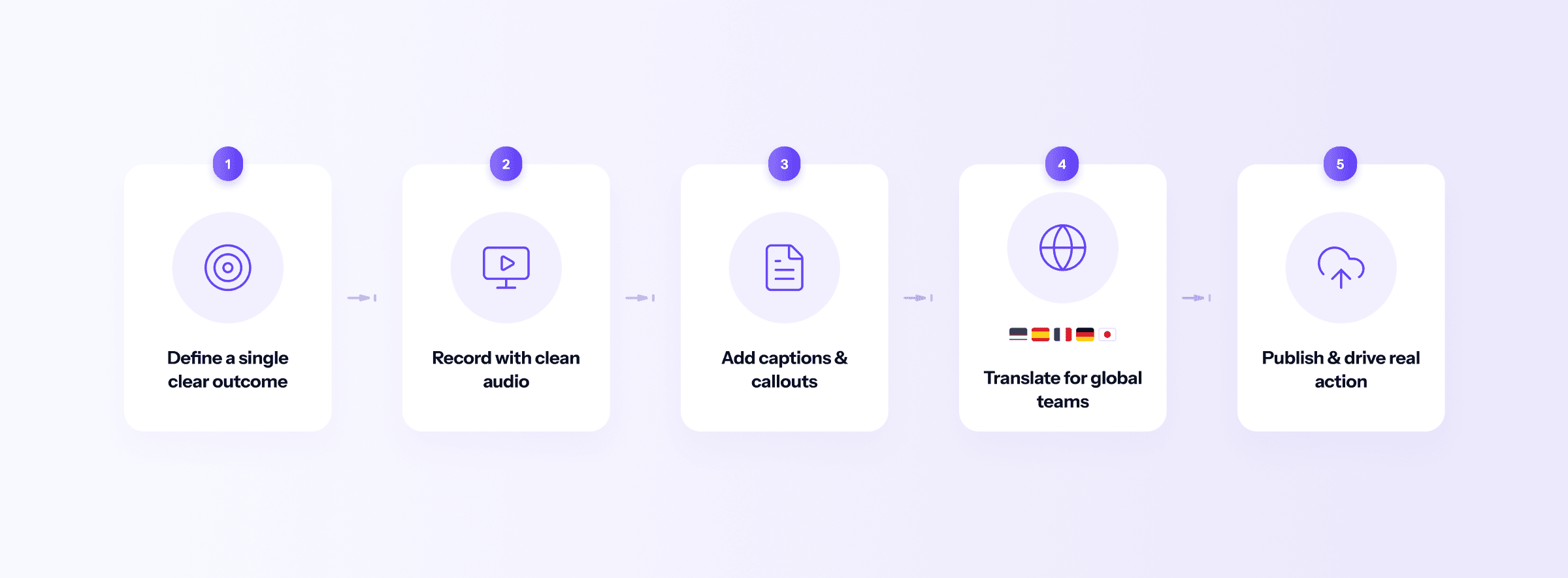
Effective video creation means designing backwards from that behavioral outcome. What do you need the viewer to do after watching? What is the minimum information required to get them there? What is the single clearest next step you can give them at the end? Every production decision, from length to structure to closing CTA, should serve those answers.
In concrete terms, this means four things. Define the outcome before you hit record. Keep each video to a single topic. Open with what the viewer will be able to do, not with background context. Close with one specific action, not a general invitation to ask questions.
The Accessibility Requirement Most Teams Are Underestimating
Captions deserve a section of their own because they are both systematically underused and more impactful than most teams expect.
80% of people who use captions are not hearing impaired (Verizon Media and Publicis Media, 2024). They are watching in an open-plan office, on a commute, in a language that is not their first, or in an environment where turning on audio is not practical. Captions are not an accessibility accommodation for a minority of viewers. They are a viewing mode for the majority.
Beyond engagement, the compliance landscape is tightening. Digital accessibility lawsuits in 2024 reached 4,187 and are pacing 37% higher in 2025 (UsableNet, 2024). The ADA Title II compliance deadline for WCAG 2.1 Level AA, which requires synchronised captions for all pre-recorded video, hit in April 2026 for public entities. For enterprise teams distributing training content externally, this is no longer a future consideration.
The practical standard is: every video, captioned, in every language it will be distributed in, with captions reviewed for accuracy before publishing. Auto-generated captions are a useful starting point, not a finished product.
What to Measure Once the Video Exists
Most teams measure video output: videos created, hours of content published, completion certificates issued. These metrics tell you about production volume. They do not tell you whether the video is working.
The metrics that actually matter are behavioral: what did viewers do differently after watching? The table below maps the most useful video performance metrics to the action they should trigger.
Metric | What it tells you | When to act |
|---|---|---|
Completion rate | What percentage of viewers watch the video to the end. | Below 60% on a module under 5 minutes: restructure or shorten the content. |
Drop-off point | Where in the video viewers stop watching. | A consistent drop at the same timestamp indicates that section is losing viewers. |
Rewatch rate | Which segments viewers replay. | High rewatch suggests the content is unclear or too fast—slow it down or add annotations. |
Post-video action rate | Whether viewers take the defined next step after watching. | Below 30%: the next step is unclear or not appropriate for the context. |
Support ticket deflection | Whether relevant support tickets decrease after the video is published. | No measurable change: the video is not being surfaced at the right point in the user workflow. |
Metrics framework adapted from Intellum Product Experience Report (2024), Clixie Video Retention Playbook (2025), and Continu Corporate eLearning Statistics (2024).
Drop-off data is particularly valuable because it is specific. If 40% of viewers stop watching at the 2:30 mark of a four-minute video, that timestamp contains something that is losing them: a section that is too dense, a pace that has slowed, a topic shift that feels irrelevant, or a visual that does not match the narration. Text-based documentation gives you none of this signal. Video analytics make the failure point visible and fixable.
The Production Bottleneck That Undermines All of This
Everything above assumes you can create video at the pace your content needs to be updated. That assumption breaks down quickly for most teams.
A product update ships. A process changes. A new market requires a different language version. In a traditional production workflow, each of these triggers a new project: script revision, re-recording, editing, caption update, re-export. The time cost of that cycle means most teams let their video library fall behind rather than maintain it.
This is where the best practices above become academic without a production model that supports them. When we moved from unstructured to structured documentation, leaders understood that content suffered because the author had to address structure as well. The solution to most content problems is to be able to simplify processes so that some part of creation becomes automated. The process should take care of it. This leaves more time to focus on the content.
Zenious addresses this directly: screen recordings go in, polished video documentation comes out, with captions auto-generated and translations available in over 100 languages. The gap between knowing what makes a video effective and being able to produce video at that standard, consistently and at scale, has historically been a production problem as much as a knowledge problem. Closing it requires both.
The teams that build effective video libraries are not the ones with the largest production budgets. They are the ones where the cost of creating a video is low enough that staying current is easier than falling behind!
Sources
Whatfix. (2025). 19 Examples of Corporate Training Video (+Best Practices). whatfix.com/blog/training-video-examples
Learning Management System Insights. (2024). Corporate eLearning Completion Rate Benchmarks.
Continu. (2024). Corporate eLearning Statistics. continu.com/research/corporate-elearning-statistics
D-MAK Productions. (2026). Corporate Training Video Production Guide. dmakproductions.com
Sowflow. (2025). How to Create Effective Video Training: A Step-by-Step Guide. sowflow.io
Research.com. (2024). Training Video Trends and Retention Statistics. research.com/education/training-video-trends
TechSmith. (2024). Create Employee Training Videos. techsmith.com/blog/create-employee-training-video
Intellum. (2024). Product Experience Report: Customer Education ROI. intellum.com
Clixie. (2025). How to Calculate Retention Rate on Videos. clixie.ai
Verizon Media and Publicis Media. (2024). Accessibility in Video: Caption Usage Data.
UsableNet. (2024). Digital Accessibility Lawsuit Report. usablenet.com
Training Industry. (2024). L&D Professionals Survey: Video in Corporate Training.